Let’s play with AI.
こんにちは。
20cmのアルミフレームを6本注文したつもりが、200cmのアルミフレームが届いてしまったAI coordinator管理人の清水秀樹です。
皆様、商品を注文するときは桁入力間違いに注意しましょう。
さて、本日ご紹介するAIは、
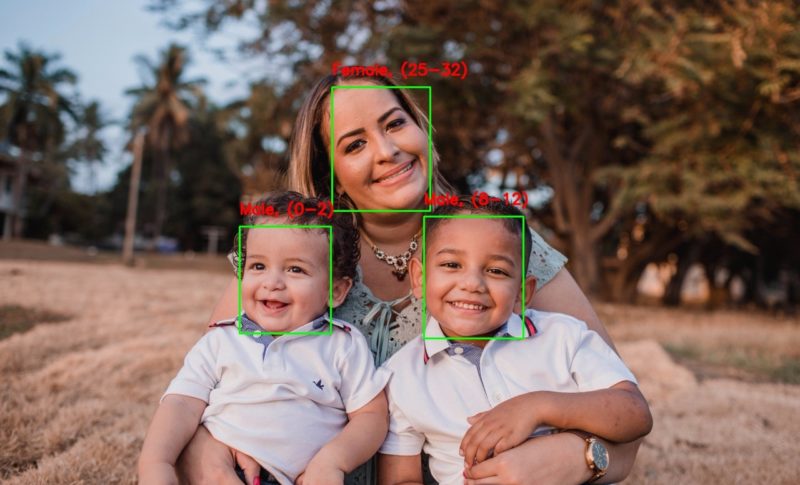
リアルタイム映像から性別と年齢推定が容易に出来るDeepLearning技術をご紹介したいと思います。
最近は物体検出だけでなく、人物の属性情報までも識別できるAIモデルが次々と公開され始めているので、それを試しているだけでその凄さやAIの進化のスピードを実感できます。
日々、本当に優れた技術や論文が紹介されており、またオープンソースで公開されていて、それを試しているだけでも楽しいですね。
この辺りのモデルを組み合わせて動かせるようにすれば、映像から色々な状況分析が可能となるAIシステムを簡単に作り出せるようになりますね。
興味がある方はぜひ色々試してみてください。
早速、性別と年齢を推論してみよう
ソースがこちらのGitHubリポジトリで公開されています。
こんな簡単に試せる面白い技術を公開頂いてありがとうございます。
ここで紹介頂いている技術は、
- 性別
- おおよその年齢
を推論してくれます。
ということで、実際に試してみた動画を紹介します。
如何でしょうか?
私自身の顔自体は割と正しく推論できていました。
顔を大きく撮しているからでしょうか。
こういった形で年齢や性別が予測出来るようになると、色々なところで威力を発揮出来そうですね。
例えば、年齢別の行動パターンや、性別や年齢による集客の状況分析など。
実用化に向けてさらに精度が上がれば、お店の中を歩くお客様の導線に属性情報も付加することで、お客様の年齢性別にあった行動パターンの分析など、活用用途が本当に増えそうです。
しかもオープンソースとして利用できるのであれば、一気にそういった使い方の広がりを見せるかもしれません。
AI技術は本当に凄いですね。
しかもちょっと勉強すれば、誰でも扱えるようになる。
オープンソースは本当に偉大です。
動画出力ができるように改造
もともとあったソースでは顔検出時にのみフレーム出力するようになっているのと、動画保存機能がなかったので、そのあたりの機能を追加しました。
# Import required modules
import cv2 as cv
import math
import time
import argparse

import numpy as np
import moviepy.video.io.ffmpeg_writer as ffmpeg_writer
from moviepy.video.io.VideoFileClip import VideoFileClip

def getFaceBox(net, frame, conf_threshold=0.7):
    frameOpencvDnn = frame.copy()
    frameHeight = frameOpencvDnn.shape[0]
    frameWidth = frameOpencvDnn.shape[1]
    blob = cv.dnn.blobFromImage(frameOpencvDnn, 1.0, (300, 300), [104, 117, 123], True, False)

    net.setInput(blob)
    detections = net.forward()
    bboxes = []
    for i in range(detections.shape[2]):
        confidence = detections[0, 0, i, 2]
        if confidence > conf_threshold:
            x1 = int(detections[0, 0, i, 3] * frameWidth)
            y1 = int(detections[0, 0, i, 4] * frameHeight)
            x2 = int(detections[0, 0, i, 5] * frameWidth)
            y2 = int(detections[0, 0, i, 6] * frameHeight)
            bboxes.append([x1, y1, x2, y2])
            cv.rectangle(frameOpencvDnn, (x1, y1), (x2, y2), (0, 255, 0), int(round(frameHeight/150)), 8)
    return frameOpencvDnn, bboxes


parser = argparse.ArgumentParser(description='Use this script to run age and gender recognition using OpenCV.')
parser.add_argument('--input', help='Path to input image or video file. Skip this argument to capture frames from a camera.')

args = parser.parse_args()

faceProto = "opencv_face_detector.pbtxt"
faceModel = "opencv_face_detector_uint8.pb"

ageProto = "age_deploy.prototxt"
ageModel = "age_net.caffemodel"

genderProto = "gender_deploy.prototxt"
genderModel = "gender_net.caffemodel"

MODEL_MEAN_VALUES = (78.4263377603, 87.7689143744, 114.895847746)
ageList = ['(0-2)', '(4-6)', '(8-12)', '(15-20)', '(25-32)', '(38-43)', '(48-53)', '(60-100)']
genderList = ['Male', 'Female']

# Load network
ageNet = cv.dnn.readNet(ageModel, ageProto)
genderNet = cv.dnn.readNet(genderModel, genderProto)
faceNet = cv.dnn.readNet(faceModel, faceProto)

# Open a video file or an image file or a camera stream
video_cap = VideoFileClip(args.input if args.input else 0)
padding = 20
out_path = "1111.mp4"
video_writer = ffmpeg_writer.FFMPEG_VideoWriter(out_path, video_cap.size, video_cap.fps, codec='libx264',
                                                    preset='medium', bitrate=None, audiofile=args.input,
                                                    threads=None, ffmpeg_params=None)

frame_id = 0
for frame in video_cap.iter_frames():
    print('frame id: {}'.format(frame_id))

    frameFace, bboxes = getFaceBox(faceNet, frame)
    if not bboxes:
        print("No face Detected, Checking next frame")
        # continue

    for bbox in bboxes:
        # print(bbox)
        face = frame[max(0,bbox[1]-padding):min(bbox[3]+padding,frame.shape[0]-1),max(0,bbox[0]-padding):min(bbox[2]+padding, frame.shape[1]-1)]

        blob = cv.dnn.blobFromImage(face, 1.0, (227, 227), MODEL_MEAN_VALUES, swapRB=False)
        genderNet.setInput(blob)
        genderPreds = genderNet.forward()
        gender = genderList[genderPreds[0].argmax()]
        # print("Gender Output : {}".format(genderPreds))
        print("Gender : {}, conf = {:.3f}".format(gender, genderPreds[0].max()))

        ageNet.setInput(blob)
        agePreds = ageNet.forward()
        age = ageList[agePreds[0].argmax()]
        print("Age Output : {}".format(agePreds))
        print("Age : {}, conf = {:.3f}".format(age, agePreds[0].max()))

        label = "{},{}".format(gender, age)
        cv.putText(frameFace, label, (bbox[0], bbox[1]-10), cv.FONT_HERSHEY_SIMPLEX, 0.8, (0, 255, 255), 2, cv.LINE_AA)
    video_writer.write_frame(np.clip(frameFace, 0, 255).astype(np.uint8))
    frame_id += 1
        # cv.imwrite("age-gender-out-{}".format(args.input),frameFace)
video_writer.close()
AI coordinatorのGitHubリポジトリでも公開していますので、参考にしてみてください。
今後に期待
人物の属性情報だけでなく、個人を識別出来るソースコードも公開されています。
近いうちそれらも試してみて、ご紹介していきたいと思います。
他にも何か面白いものがあれば是非ご連絡頂けると嬉しいです。
それではまた!!
About The Author